Showing posts with label SHELLY1. Show all posts

2021-11-20

ESP8266 vs ESP32

When I started using the Espressif processors I started with the ESP8266 and Arduino development platform. It is all C++ based (which is not really my favourite). But it is a really good starting point for anyone wanting to play around with microcontrollers.

One of the key things here is the available hardware. A "programming" lead is just a USB serial which is available for a few pounds, The Arduino development platform is free to download. But most importantly there are thousands of very cheap ESP8266 based devices on the market, easy to use, and many easy to access programming pins. The ESP8266 is possibly the most popular basis for IoT (Internet of Things) devices like smart light switches and the like.

However, having managed to make some PCBs (milled from copper boards) for ESP8266 based modules, I eventually decided to move on to using the ESP32. It had a number of advantages as a processor itself, but also the ESP IDF which works on linux and MacOS making it easy for me to code in C, which I prefer. The ESP IDF and various libraries are still a work in progress and far from perfect, but generally work well. I have made a load of projects based on ESP32.

But being ESP32 means I lack the thousands of ready made modules that I can use. I have designed and made loads of circuit boards myself, including a complete access control and alarm system.

What is now nice to see if that there are finally some ESP32 IoT devices coming out. Manufacturers are moving to ESP32 based boards. One of the most useful I have found is the Shelly 1. What is especially nice is it has direct pins for programming access - without even taking apart. It is simple, just a switch input and a relay output, but runs of mains, or 12V DC (do not use the GPIO pins when running on mains as they are live).

Shelly have just launched the Shelly plus 1, which is basically the same as the ESP8266 based Shelly 1 device, but ESP32 based. It also has programming pins easily accessible (though smaller), a relay and switch input. In this case the 12V is a screw terminal rather than a link you have to change.
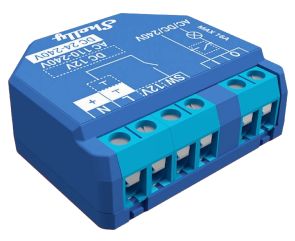
The good news though is I can load my own code, ESP IDF based, on to this. It means I can use these modules directly on, say, my access control and alarm system. I had found I needed various simple 12V single input modules for the likes of a door contact or fire alarm input and previous used boards I made. But at this low price the Shelly plus 1 is a no brainer, as they say. Using my code I can set secure boot, and encrypted communications as part of the alarm system. Even something simple like an alarm bell could use one (single output for bell and single input for tamper).

My first actual project with one of these is for a servant bell system. I have an actual bell, which I want to "ding". I am using 12V DC, but the bell really only "rings" using AC. Using DC you need a small pulse to do a clean "ding". Too short and the clanger does not hit the bell. Too long and it hits it and holds, making more of a "clunk" than a "ding. Get it right and you get a nice clean "ding".

I was using tasmota32 code for this, but that is designed to do pulses of 200ms at least and not that consistent - perfect for blinking lights and the like, but no good for what I need.

So, back to my own code, ESP IDF based, using my existing libraries, and I am now starting something a bit like my own tasmota in a way - programmable inputs and outputs. Expect the outputs (which is all I have coded so far) are configurable to the millisecond.

I have found 15ms seems to be the sweet spot to make the bell ding...

2021-11-18

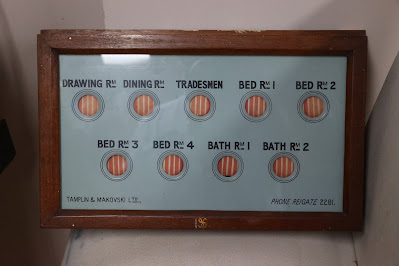
No, we don't have servants

But if we did, we'd need one of these beauties.

Well, the plan is to make this work for a friend of mine.

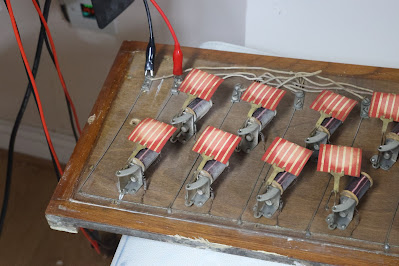
Believe it or not, it is "electric". With bare wires nailed to a board, and coils! With a bit of cleaning up and soldering, I have all the coils working.

With a bit of experimentation I could see how to drive this. I think I can even use what remains of the original wires which go round the back where they were just cut off. Basically the coils pull the swinging indicator, and on release it is left swinging back and forth. Oddly there is no sort of sounder, so I wonder how it worked to get people's attention. I'm planning an additional bell.

So, how to drive it - well it looks like a suitable resistor will allow it to work quite easily on a 12V supply, with a back EMF diode.

Relay board

One simple solution is an off the shelf relay board. Like I used for my DEFCON lights. One small snag is that they come with 8 relays and this needs 9 (10 if you include the bell).

Definitely a possibility though.

Custom board

Another simple enough idea is I make a relay board with 10 outputs. PCBTrain can turn these around in a day, and it may be a nice useful board design. I'm in two minds whether to use a relay, a solid state relay, or a driver (that drives 0V/12V). All could handle the approx 1A needed, especially as it would be a short pulse. I need to think about the other uses of these as part of the design, obviously.

The drivers are nice in that they take a lot less space, but are not as flexible as they drive the output rather than simply being an effective relay contact.

I also have to think how I make one of these - as almost all the chips I would use are on something like a year lead time! Thankfully I have several solid state relays and several driver chips in stock, and enough power supplies.

I could, of course, take the opportunity to consider using the newer ESP32-S2 modules, which seem to be available. This would all make this more of an R&D project, which is not a bad idea.

It would all take time though, and I am quite keen to have this ready for Christmas.

Shelly

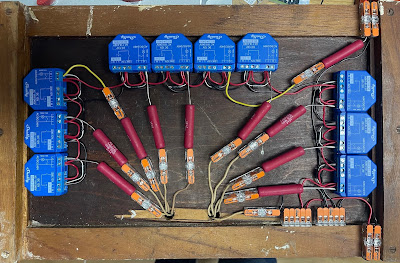
There is, of course, a simple answer, and ironically likely to be the cheapest, and that is just use a Shelly1 relay module. Even needing 10 of them is not expensive, and there is space on the back of this thing. They are available and in stock for next day.

This does feel like cheating somewhat but may be the best option. Certainly worth prototyping with one of them to start with.

Then what?

One way or another I'll end up with WiFi connected indicators. So we need a way for that to work from places around the house. Buttons, or a pull cord, etc.

For this, by far the simplest is the Shelly option, as a light switch, sending an MQTT message when pressed.

P.S. Blogger is broken again, even with clearing caches, and so I cannot actually reply to comments!

P.P.S. I went with Shelly Plus 1, but my own code...

2021-09-04

Shelly1 on 12V

I have used Shelly1 for a while, and have loads of them in use.

One of the nice features is they can run from 12V. Well, actually, they can run from mains, 24V-60V DC, 12V DC, or (via connector pins) 3.3V DC. You move a link for 12V working. Pretty versatile.

I have used them in the house here on my door bell circuit which runs from a standard alarm system 12V battery box. All fine.

I planned to use with an alarm system as well, running from the 12V battery box. First two were fine, but then the next did not work. I tried another and it also did not work.

I did some googling and people report that the 12V is meant to be exactly 12V. I must ask Shelly to confirm really, but the comments were 12V and not a battery (which is 13.8V). My example use was actually 14V. It would be a pain if it could not run from a standard 12V battery box.

Well, pushed for time, I found some 12V LDO linear regulators and got for next day. Oddly when installing these to give an exact 12V clean DC for the Shelly, the ones that were not working still did not work?!? I tried yet more, and they did work.

What is even weirder is one that was working off 14V did not work off 12V, so I had to find another. It is a good job I had 20 of them.

So it seems the 12V working, is, err, fussy, and inconsistent.

Anyone else seen this?

Some simple Eufymake tips 3D print over print

My Eufymake UV ink printer has issues, and so does dealing with Eufymake as a company, as I have blogged, but today, let's look at it wo...