Showing posts with label USB. Show all posts

2025-11-26

USB project

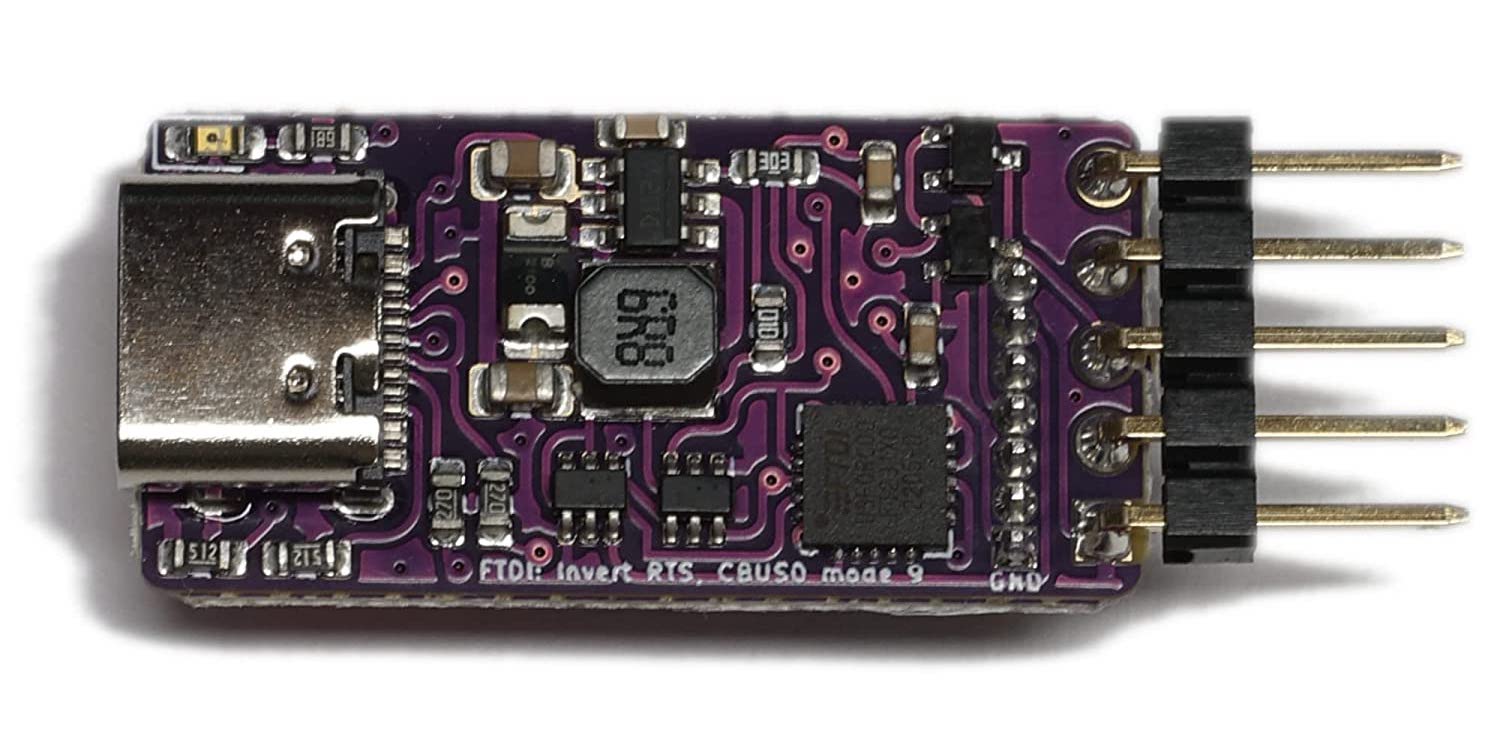
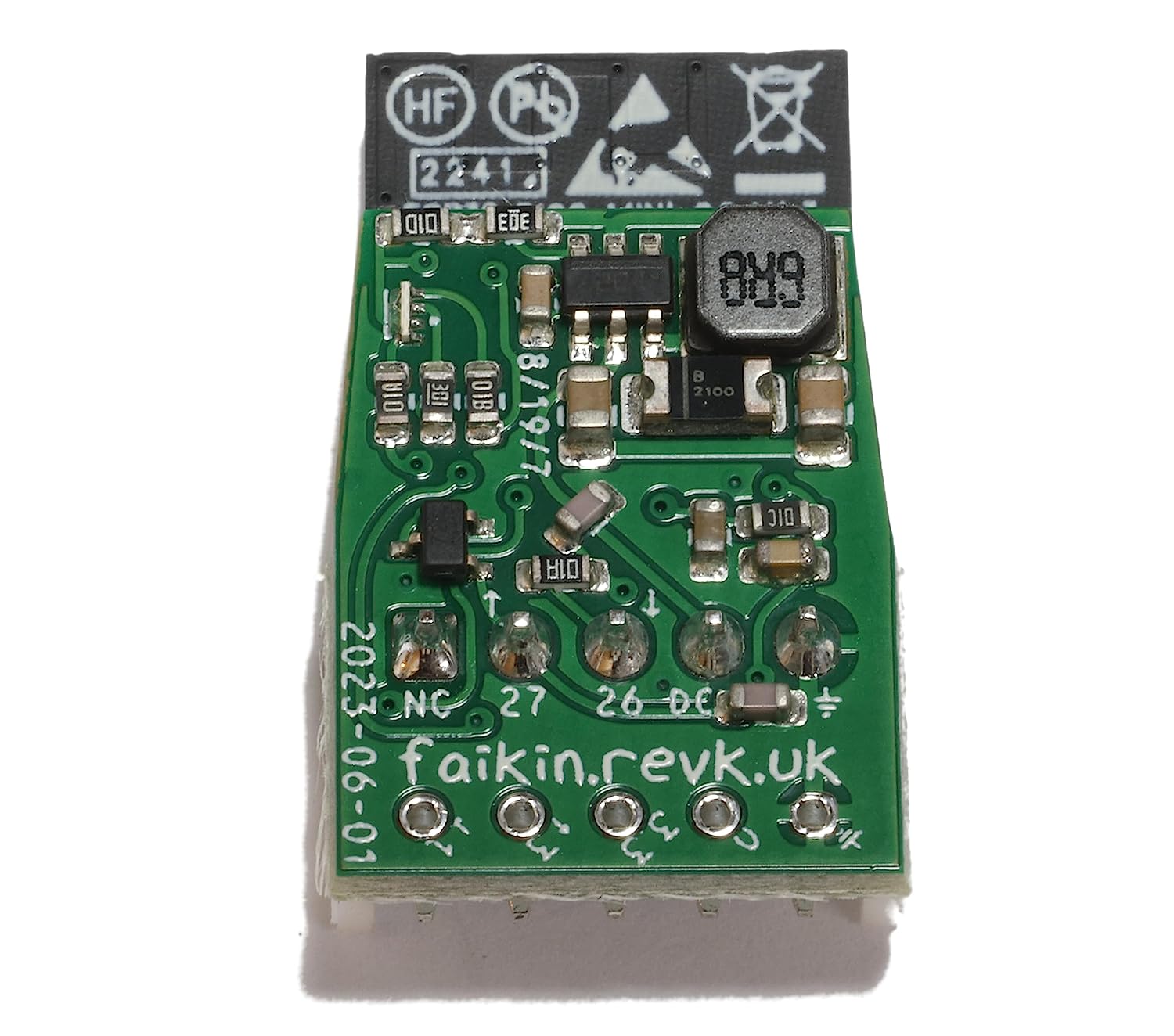
I am making a simple USB device. It looks like this. OK this is 3rd version, after some wiring issues.

What does it do?

Well, it is simple, it is a smart card reader, but also works as a passive smart card in-line monitor. The "card" on the side can be snapped off to just be a reader.

This means I can talk to, for example, SIM cards. We sell SIM cards, and this can allow us to read the ICCID, but some cards we have been able to use ADM1 codes to change operator name and other such things.

We used to do this in the card printer which has a contact station. But the latest batches of SIMs do not work in the printer properly, which is a shame, so working on staff having a reader. I hope we can get nicer cards in future as they are nice when custom printed.

But I can buy a smart card reader? Well yes, but making one is (a) fun and educational, and (b) allows us to make a reader that simply works as a USB keyboard typing the ICCID. Normal card readers won't do that, and you need drivers and code. This will be a neat accessory for staff handling SIM cards.

But I may as well also make it in to a CCID compliant smart card USB reader device whilst I am at it. Why not?

Why a monitor as well

This is simple really - making it a monitor is kind of temporary, hence snap off design. It allows me to see in practice the exact working of card readers. There is a spec, well several versions of specs. Last time I looked at this is was all simple 9600 Baud data each way. Now it is initially roughly 9600 Baud but actually 1/372 of the clock, and then it changes clock divide and Baud rate with a message (which I have yet to find documented). This kind of shows why the monitor was useful, if I cannot find the spec that defines this!

Even just the T=0 protocol is fun. That is well defined, and ETSI document it for free (yay!). But a passive monitor has fun splitting things up cleanly as it does not know which way data is being sent. I also ended up basically clocking in bit streams using ESP32 RMT hardware and then auto Baud rate on that. To my surprise it does work, and I can monitor the card exchanges with a real reader even with the Baud rate changes.

It is a shame the ESP32 UART cannot used an external clock with defined divide rate, but I could not find a way to do that, hence not using UART but using RMT and working out Baud rate from that. RMT basically allows you to DMA clock-in high resolution timings of 0 and 1 on the input, so software UART from there from those timings.

USB host side

This turns out to be simple. I used libusb on macOS (homebrew), and have used it with a printer before on linux. It allows me to find and connect to the device and simply do bulk data out and in messages.

The CCID standard made it easy to talk to the reader, power on the card, and send and receive messages. Very simple to get the ICCID.

This gives me a good test platform for making the CCID USB device side.

Card interface

The card interface as a reader is way simpler than monitoring as I control the clock and dictate the Baud rate. I used the ESP32 PWM to generate the clock (not sure if a better way, but did not find one). I used the UART to talk to the card.

It is not perfect - a card can expect defined extra guard time which is more than usual 2 stop bits, but the cards I am playing with seem happy. Also T=0 has a pull low during guard time if parity error mode, which I have no way we handle. The good news is that the direct connection to a card leaves very little room for bit errors. That said I had to change the recommended 20k pull up to 10k when working at 250,000 Baud.

The T=0 protocol is not that hard to then do, and I am talking to my SIM cards reliably.

Yes, T=1 and others maybe one day, but not for now. All of the cards I am working with use T=0.

USB client side

I don't expect to support all of CCID initially, but should be able to do the basics. I actually want two modes here, a keyboard to type an ICCID, and a CCID USB reader.

TinyUSB is a fucking nightmare, sorry to say, and apologies to those working on it. I am sure there are reasons, but it has been very very hard work just getting started.

My biggest issue is the load of different versions and documentation. Even the very latest ESP IDF documents on tinyusb (saying add dependency esp_tinyusb not tinyusb) have the basic initial examples that simple do not match the library!

There are examples for a USB HID device, but they are confusing to me (yes!), and the code seems to cover HID, CDC, MSD, and so on - some specific device classes. I eventually found some mention of Vendor specific class which may do what I want.

So yes, finally, the answer is using tinyusb and not esp_tinyusb. And I can make that work, sort of. I think a separate blog post with code examples once done.

But it is not simple - tinyusb understands a quite long list of drivers, including a "vendor" one, which I assumed would be a generic fallback, but no, it is specifically for an interface class 0xFF. I can't find a fallback/generic one yet. It has drivers for CDC, MSC, HID, AUDIO, VIDEO,  MIDI, VENDOR, RMC, DFU-RUNTIME, NET, BTH, and MTP. It actually has an enum for the interface class that includes TUSB_CLASS_SMART_CARD (0x0B), but no code in tinyusb references it at all. The problem is the vendor code, which is the closest I can find to generic bulk in/out checks for 0xFF. I have deleted the check to make some progress for now. Would be nice to find a legit way to do that though.

Arg! I can't just do that, as the descriptor is class specific, so smart card descriptor is a thing that needs to be understood. It seems I can receive packets, but not send them!

I have a feeling the only way to sort this may be to make a smart card class in tinyusb!

Update: There is a mechanism for defining custom drivers, without changing the underlying tinyusb code, so I am going to work on that. Thanks to the team at tinyusb for help. Published details on separate blog.

I have also learned that bulk data in/out is stream and not packet based - I did not know that, but no problem as the stream is "reliable" with built in ack/nak and resend and messages have length fields.

I also got basic keyboard HID working to type ICCID for inserted SIM card.

Publishing

The code is likely to be very narrow to our needs, and so this is actually one of the few projects not published open source, yet, but I may sell the hardware at some point as I'll have a few spares. I may do some open source stuff for it eventually.

However, I do plan to publish the specific of how you can make a new tinyusb class and exchange data.

Update: All working! Taken me a couple of weeks, but working. Yay!

2024-07-21

Bulk ESP32-S3 programming

Programming an ESP32-S3 is really easy.

The S3 has build in USB, which means literally just connecting GPIO 19 and 20 to D- and D+ on a USB socket - not even any resistors! It operates as a USB device out of the box, appearing as a serial/JTAG port. It just works on standard USB serial drivers on linux and MacOS (and I assume, Windows).

Using the ESP IDF tools I can type.

idf.py flash

And that is it, it detects the chip, and flashes the bootloader and code.

No special leads, it is that simple.

Smaller footprint

The only issue is that this all works if you have the complete ESP IDF installed, with its python and cross compiler environment, and your code checked out and built (or able to build). This is not hard, there are simple steps to do this, but it takes a lot of space.

So, I wanted something simpler so I could make a small machine, ideally a Raspberry Pi, that just flashed code. Thankfully, all I need is esptool, i.e.

pip install esptool

And then I can flash using that rather than the whole IDF. It is more complex, e.g.

esptool.py --chip esp32s3 -p /dev/ttyACM0 -b 460800 --before=default_reset --after=hard_reset write_flash --flash_mode dio --flash_freq 80m --flash_size keep 0x0 release/LED-S3-MINI-N4-R2-bootloader.bin 0x10000 release/LED-S3-MINI-N4-R2.bin 0x8000 release/LED-S3-MINI-N4-R2-partition-table.bin 0xd000 release/LED-S3-MINI-N4-R2-ota_data_initial.bin

But that is simple to script. One tool installed and the binaries from my repository, and job done!

One device after the next

The challenge is that I want to do bulk programming - i.e. flash a device, get clear confirmation it worked, then just plug in the next device. I don't want to run a command each time.

Getting confirmation it works is easy as all my boards have an LED, usually a tiny 1x1mm WS2812 colour LED, and that starts blinking as soon as the board starts. Indeed, the code is signed and checked on boot, so if any issues flashing it won't start.

Indeed, where I have done this I have had there separate instances running and 3 USB ports and leads, so I could plug in one after the other, unplugging when I see it is flashed and running. Really slick!

What I was doing was

idf.py flash monitor

This flashes, and then runs, and monitors serial output (which can be useful if there are additional diagnostics to show, but the main indicator is the on board LED).

The problem is you then have to kill the monitor for each board (ctrl ]). Even just disconnecting USB appears to wait for device to reconnect. I created a convoluted bit of C code to run monitor, and check output, looking for the string it gets for a new device, and exit. That way I could flash, and then run this, in a loop. Works well.

The problem is that, once again, this is using the whole ESP IDF just to run the idf.py command. And it seems esptool does not do a monitor function!

My own monitor code

In principle it is really easy to make my own C code to open the USB (serial) port directly, and set DTR and RTS appropriately to reset the board in running mode (rather than bootloader mode).

This worked perfectly on my Mac. Some simple code, waits for the right string to indicated a new board, and exits. It also does not need the whole ESP IDF to run.

But no!

  • The first issue is that the ESP32, with no code loaded, seemed to trip the power on the USB port. It is odd, and maybe the regulator I am using creates just enough of a power spike, or something (never bothered my Mac), I don't know. The fix was a powered USB hub.
  • The next issue is that once code is loaded, even with a powered USB hub, it seems the start up with WiFi is enough to then trip the power, so it constantly resets and does not blink the LED.
  • I finally found a power hub that just works with linux.

But there is weirder!

The other weirdness was that on the raspberry Pi, it seems it would not play properly with RTS and DTR and constantly came up in bootloader mode regardless. I simply could not get it to play, it was like DTR was not being set. The only difference seems to be it is using an OTG serial driver. On two separate bigger linux boxes, using a different driver, it works as expected (and ends up in a boot loop, as I said above).

I don't know how one can change the serial driver on a Pi, suggestions welcome (google did not help me).

2023-11-06

USB-C Plugs, Sockets, and 5V supply

Assuming you want to use a USB Type-C connector, but just want USB2 (D-/D+) and 5V power.

So many get this wrong, however, it seems the answer is quite simple.

It would seem there are a number of connectors you can get, with just the main USB2 pins, or with all USB-C pins.

For a USB-C Socket, you need to connect CC1, and CC2, separately, via 5k1 resistors to GND. Like so.

However, for a USB-C plug, the CC1/CC2 pins are actually CC and VCONN. You connect CC via 5k1 to GND, and leave VCONN unconnected. If you connect both then it won't work! Like so.

Yes, the connector is reversible, so actually it does not matter if A5 or B5 are connected to the 5k1 resistor, just as long as only one of them is.

2023-08-08

ESP32-S3

I have worked through a few of these processors - starting with the ESP8266. I moved to the ESP32 quickly and have not looked back - initially with the WROOM module (which can be hand soldered), to the PICO module (which is smaller and needs solder stencil and paste).

But finally the ESP32-S3 (version 3 of the silicon) is available as a module, the ESP32-S3-MINI-1, so I am finally starting to use that. The fact that the ESP32-PICO-MINI seem to suddenly be out of stock, seems like the time to upgrade designs.

The S3 has several improvements which may be useful.

Size matters

A key difference is size. The ESP32-PICO-MINI (i.e. S1) is 13.2mm square plus antenna, but the ESP32-S3-MINI is 15.4mm square plus antenna. So 2.2mm wider and longer.

For almost all of my designs this slight change does not matter, and indeed, for some the other changes actually make things smaller. There are exceptions - the module to go in to the case of a Galaxy keypad may be too big as there is very little space.

However, there is one useful side effect of this extra size. I have a small 5 pad footprint for serial programming - it uses the same 5 pins as the Shelly, and is pretty much the minimum you can have for serial programming and debug (see on image above on the right of the components). Now the module is slightly bigger than can actually fit behind the module, so effectively taking no extra space on a single signed board. This is one of those small details that saves space - e.g. the design show above is now a couple of mm shorter as a result.

General purpose I/O

Another change is the GPIO. The S1 modules have fewer GPIO (27), but several of them are input only - all of one side of the module has no output GPIO. There are also a number of NC pins.

The S3 has more GPIO (39), and all of them are input and output. There are no NC pins (apart from GPIO26 when using the PSRAM based module). This means all three sides of the module have lots of usable GPIO. This is perfect for tracking as you can easily track to the nearest convenient GPIO, which saves space.

USB

This is where it gets both interesting and slightly disappointing.

The S3 has USB built in, so direct connection of D- and D+ pins to specific GPIO. It can be disabled, and it can be used in s/w as USB server or client side as needed, which is very cool. This saves space on many designs if no UART needed.

The default, starting point, is USB JTAG with USB serial. This appears on my Mac, for a totally un-programmed module, as a USB serial port. I can connect to it and see the boot loader serial output. This is excellent as it means I can use a much simpler interface to the module - no need for a UART. As many of my modules have USB for programming and debug, this makes it a lot simpler.

However, there is a snag, it seems. Whilst this works as you would expect as a serial console port over USB, it seems it does not provide the normal connection for RST to reset, and DTR to boot mode (GPIO0). So you can only really use it to load code if you have a button for GPIO0 and RST on your board. This is a lot of board space, and really is silly.

 UPDATE: I don't know what was wrong with my first test boards, but this is working, so, all OK! I think perhaps I simply had out of date tools on my Mac (e.g. esptool).

Now, there are a few rays of sunshine.

  1. It seems when un-programmed it does work in boot mode and so can be flashed, even though no RST or DTR working. That said, it seemed oddly intermittent, so I plan to do more testing on that. It may mean I can use USB for the initial loading of code and fuse settings.
  2. Obviously as a USB JTAG interface it may be that there are ways to force a reset and boot mode or load code over JTAG, but this is not obvious from the documentation. If I can work that out I can make boards which do not also need my 5 pad serial header, which is what I was aiming for.
  3. It is possible to internally detach this USB JTAG/serial and run USB from code in the module - this can handle code loading as a feature you compile in it seems (though even that suggests GPIO0 needed - why?!). I have not sorted that yet. My main concern is that if the code in the module does not have this, or is crashing, or whatever, I will have no fall back unless I have my serial header.

So more to do, and any help welcome. If there is a fallback for the USB JTAG working that allows code loading without having to do GPIO0 and reset, that would be really nice. For now, I'll keep my 5 pad serial, under the chip itself, as a fallback.

In theory OpenOCD is loaded, and should work for the JTAG. No idea how to use that yet, but that is a different matter as it does not work - some obscure error which sounds like a libusb issue on modern Macs. Arg!

Security

One small concern - JTAG is usually a very powerful interface on a system. If the chip is left with USB JTAG set up, perhaps because that is the only way to load code sensibly, it may also mean it can be controlled such as to allow secure boot and flash to be accessed. I.e. single stepping code after loading, etc. It may be that for security it needs the JTAG USB disabling (a one time e-fuse setting). I need to investigate. As a whole my security threat considerations have generally be based on physical access being a reasonable challenge, as the serial interface represents a similar risk in some cases, but it depends on the application.

2023-06-16

To USB or not to USB, that is the question!

I have done quite a lot of small boards now, as I have blogged at various points.

It has helped me build up my skills in circuit and PCB design, and over time I have moved to different approaches for things as I have learned. Some things driven by practical usage, some by cost, some by simplicity.

At present I am working on ESP32 based boards, and I may yet move on to ESP32-S2 or ESP32-S3, at least one of which does some direct USB, but for now, for ESP32, I need serial connection for programming and debug. The ESP32 are especially appealing in the form of the ESP32-PICO-MINI-02 module which has extra flash and RAM which is invaluable.

I have "standardised" on a USB-C connector for my boards, where needed, for simple power. That is most boards, e.g. this LED strip controller.

It uses USB-C for the 5V supply for the LED strip, and via 3.3V regulator for the ESP32.

In many designs, I have included an FT231XQ USB UART in the design, allowing not just power, but programming and debug via the USB-C connector. This works really well. It makes it very simple to develop on. I have even learned my lesson with diodes on boards which can also have 12V DC, and USB connecting both at the same time :-)

But the FT231XQ is not a cheap part, and not a readily available part (a lot of parts are now available after COVID, but some still in very short supply). So I have been making even these boards have an alternative for when the FT231XQ cannot be fitted.

Indeed, I have actually started making boards which have no FT231XQ at all, even if they have a USB-C socket for power (like the one shown above).

This means I need some sort of header. One of the reasons I went with the UART in the first place is any sort of sensible header connector would take as much board space as the UART chip, and add cost or time, especially if a through hole connector.

But, the way Shelly do it has come to the rescue. They use a small 1/10" 5 pin header (and a 1/20th" 7 pin header) - a socket on the board, and I made this to work with them. These are useful if you are wanting to reprogram Shelly with say tasmota, or for any projects with similar devices. See Amazon.

It has header pins for the 5 and 7 way connectors. The shelly has a proper socket for these.

However, I can simply make the board have holes, instead of a proper "header", like the 5 holes on this boards.

I can simply push the pins in the holes, and hold them whilst programming. Indeed, if I can get the holes just right they will fit firmly enough not to need holding and so can be used for debug as well. It is cheap - holes don't really cost anything. It does not take a lot of space, especially as it can (like that example) be under another connector even.

I am working on slight variations of the holes, to try and make a firm fit to the square pins. The latest is slotted holes. In practice this means each set of boards I get has a slight improvement and I try it. The above design had holes slightly too small - some boards needed to be "held" whilst programming (which is not really a problem, but adds some time). This is my latest design for them.

So it is a question of whether I bother with a UART on future boards. Using USB-C for power is a good idea for a lot of boards - the "Faikin" being one of the few cases where that is not sensible as it fits and existing connector with power. If I move to ESP32-S3 for example, I'll see if that can do USB sensibly directly, but I want a module like the ESP32-PICO-MINI-02 really - not sure if there is one yet.

Oh, and as you may notice, I have adopted a policy of GPIO numbers on silkscreen - it really is damn useful when you have so many generations of so many PCBs lying around. I don't do a lot of silk screen - i.e. no R1, R2, etc, but I have to do some to stop JLCPCB asking questions about pin 1. But GPIOs is invaluable. And now KiCad allows proper fonts it is slightly more fun (the above has "faikin.revk.uk" in xkcd script, err, because I can).

Update: As suggested (and as per above image) I have now gone for staggered pins, to see how that goes.

Update: The silk screen does not work that small, so going for something simpler...

Update: I am also, as someone suggested, trying a CH340X which is physically a similar size for the FT231XQ but a lot cheaper and simper to wire up.

Superimposed CH340X (green) on FT231XQ

Design for USB-A ESP32-PICO-MINI-02 with RGB LED and CH340X

Update: Fuck sake, read the data sheet. 4k7 from CTR to DTR/TNOW is needed, not 4k7 from 3V3 to DTR/TNOW. Sadly meant some boards could not even be reworked. But was able to test this for future boards.

2023-05-13

USB Lead (and the state of modern tech and advertising)

I wanted a simple dumb USB power lead, basically from USB-A with GND and 5V to a USB-C plug, for my coasters.

I looked and I looked, I could not find anything simple. Indeed this is typical of the things I found:-

As you can perhaps see, it shows a lot of active components in the USB-C plug. Indeed, it claims advancements from 2018 (1A) to 2020 (2A) and 2022 (3A) charging, perhaps justifying these many active components.

I did not want that, I did not even need D-/D+ connecting, just GND and 5V, so I looked and looked, and eventually decided to get some anyway. Basically as long as they worked for power, I could ignore the extra "tech" that may be in there.

I suspect you can all guess what happened next...

I got an extra lead, so I could cut it open. It is surprisingly hard to cut off the plastic/rubber with a broken elbow and bruised wrists, but I managed...

Yep, there are no active components, this is, indeed, just GND, 5V, D- and D+ connected. Indeed the other side is not much more and seems to be one resistor fitted. It may be there were 2 and I killed it with a pen knife - that would be consistent with CC1/CC2 connections to tell a device this is a dumb USB-A passthrough.

So this is what I wanted, a simple GND/5V pass through.

But in what way could this remotely be an improvement from the 2018 1A design or 2020 2A design? I mean how is this remotely as depicted. How is this remotely legal advertising?

Update: They are offering me a full refund, if I ask for it - wanna bet it will be in exchange for cancelling review? TBH not bothered about a refund.

2021-05-28

Battery powered

My latest project is to make something battery powered, based on an ESP32 processor. The ESP32 data sheet claims it can go down to under 1uA in a deep sleep mode. It also has an Ultra Low Power processor that can do things in deep sleep at only a few uA. It is not very clear in the datasheet for the ESP32-WROOM-32 module how low it can go - after all that has extra bits including an external flash. So it was a bit of an unknown. However, I have made something, and it works... (on GitHub)

The first board was a cock up - wrong footprint completely on a key device - kicking myself. The second version was more what I would expect - some minor errors I could work around, allowing me to prove it all works and confirm power usage. The 3rd version was great except one of the chips again had wrong footprint - but this time close enough for the device to fit without problem. I have managed to keep the device tiny - not much bigger than the ESP32-WROOM-32 itself.

The first application is actually to work with a VL53L0X ranger in the top of an oil tank, running on battery and reporting over WiFi. The next trick may be LoRa for such things.

Battery / power supply?

The first real question was whether to try and run directly from a battery, or to use a power supply?

Directly from a battery means finding a battery that is within spec to produce 3.3V. The voltage from a battery is often slightly more (when new) than stated, and depends on the battery technology. The processor will cope with voltages a bit out of range as well (3.0V to 3.6V). So a 3V battery should work. But the voltage drops as the battery runs down, and we are starting on the edge of acceptable voltages, so this could cause problems. The advantage of running directly from a battery, apart from fewer components, is the really low power modes of the ESP32 should allow a really long battery life.

With a power supply you have the advantage of using a wide range of battery, e.g. 4.5V, 9V, 12V, etc, but the big disadvantage of wasting power on the regulator itself.

I ended up using the LMR16006 from TI which is designed for battery devices, and has an idle current of 28uA when not driving much load (e.g. an ESP32 in deep sleep). It also has a shutdown mode drawing less than 1uA (see more on that later).

However, testing showed that it draws 34uA when not even connected to a load. This pretty much is explained by the 460kΩ potential divide built in to the fixed 3.3V module to drive its feedback pin. I could go for external potential divide but 460kΩ is on the top range recommended in the data sheet.

However, even 34uA is good, and can allow a battery to last years.

USB as well?

Do I need USB as well? Well, no, not really, I could have a generic programming header, but I like the USB-C connectors. They are good as a power supply when not running off battery, and make programming and debug easy. So yes, I'd like to keep the USB.

The issue is power. The USB chip (FT231X) can be powered from USB, and even work its own 3.3V I/O from that. So it can be totally off when no USB. Good.

But it is used to control EN/GPIO0 to reset and put the ESP32 in boot mode. If USB is off, the ESP32 stays in reset. Thankfully the USB chip can be configured to invert RTS and DTR if you want, so I put them through a simple transistor inverter so that when the USB is off the ESP32 is not in reset or boot mode. The result then works as expected with the debug and flashing tools in the ESP IDF.

The Tx pin to the USB when powered down was a concern, but it seems to cause no problem, and the code can turn it off immediately on start up, and in deep sleep it is not connected.

The USB chip can also feed in some useful GPIO pins, reporting when it is on (a fixed "1" on a CBUS pin), and even if it is connected to a charger not a USB device. This means the software can tell if running from battery or not, and stay awake when being used for USB debug.

How low does the ESP32-WROOM-32 go?

Well, the good news is that the ESP32-WROOM-32 does indeed use bugger all (aka 1uA) in deep sleep. This is impressive, so we are looking at under 35uA idle current for the whole board from a 9V supply when idle.

Obviously we need to wake up occasionally, but we can wake up, boot, connect to WiFi, connect to MQTT, report status, and shut down in under a second with fixed IP. Indeed, the WiFi can be in use for under half a second, which is impressive. We need to do some long term tests to confirm battery life.

Measuring the voltage?

Of course, one thing we want to measure is the battery voltage. That allows us to see if we have a low battery. It is essential for any battery based device to tell you the battery is low. The answer is a simple potential divide feeding an ADC input to the ESP32. Except that draws current! Even 1MΩ divide is 9uA at 9V, 100% of the time.

The answer is a FET, well, two FETs. I am not an electrical engineer so this needed a bit of research. One FET or transistor would not work as it had to be at the "top" of the divider. If it was at the bottom of the divider it would mean 9V going in to the ADC pin when the FET was off. But when at the top of the divider you don't have GND as a reference to drive the FET.

The answer is an N-channel FET driving a P-channel FET, all in one package. Thanks to twitter for help on this. It works! I can turn on the divider, take a reading, and turn off again. I have some resistors to ensure than when GPIOs are isolated the FET stays off anyway. Sorted.

How low can you go?

Can I do better than 35uA? Well, yes, probably. The ESP32-WROOM-32 itself goes down to 1uA or so. The regulator in shutdown goes to 1uA but as that annoying potential divider still. If I was able to shutdown and disconnect the power from the ESP32-WROOM-32, it could run off a capacitor for many seconds at 1uA.

So basically I'd need a way for the processor to turn off its own power most of the time!

The trick is ensuring that if you sleep too long, the power will come back on anyway, and indeed when first powered up.

I think I can do this with another FET, pulling the shutdown pin to GND, driven from a GPIO pin. When no power the GPIO will go to ground, pulled by parasitic diodes if nothing else, and cause the FET to go off. Of course you still have the issue of making the shutdown pin then go high when the FET is off, with the only power being the battery, so you still need that one pull up resistor. I wonder how big we can make it? If we can make it 10MΩ we waste only 1uA on that.

The same signal driving the shutdown pin could also drive a FET switching the feedback potential divider, so we turn that off too. It may need some careful design, e.g. FET at bottom of that divide, to ensure we don't fool the regulator in to supplying too much power because its feedback is not get connected, but that should not be rocket science.

For now, I'll test using the current design, idling at 35uA, and see how it goes. But I may yet make a new version that tries to turn itself off most of the time :-)

P.S. I am such a fan of solder paste now, I can't see me ordering boards without getting a stencil as well. It is so quick and so reliable, it is quite amazing really...

Some simple Eufymake tips 3D print over print

My Eufymake UV ink printer has issues, and so does dealing with Eufymake as a company, as I have blogged, but today, let's look at it wo...